 DataStep Studio
The debugger
Where does this value go wrong?
Breakpoints in the margin, step by step, the variables of each frame.
F9, then F5
dsr run --stop-at
A log that names the line of every problem and gives each data frame a NOTE. Stop a run where the value goes wrong and look inside. One live R session, for you and, if you want, your AI agent.
The film, 70 seconds, silent: the run, the NOTE that gives the bug away, the stop where the value goes wrong, the one-character fix, the tests, and the same steps as the commands an agent uses. Every log line is from a real run of the manual's example study.
One live R session
The agent runs R only through the tools you click, as the dsr command or an MCP server. Its runs fill your R Console, its stops wait in your editor, and it reads the same log and the same verdicts you do.
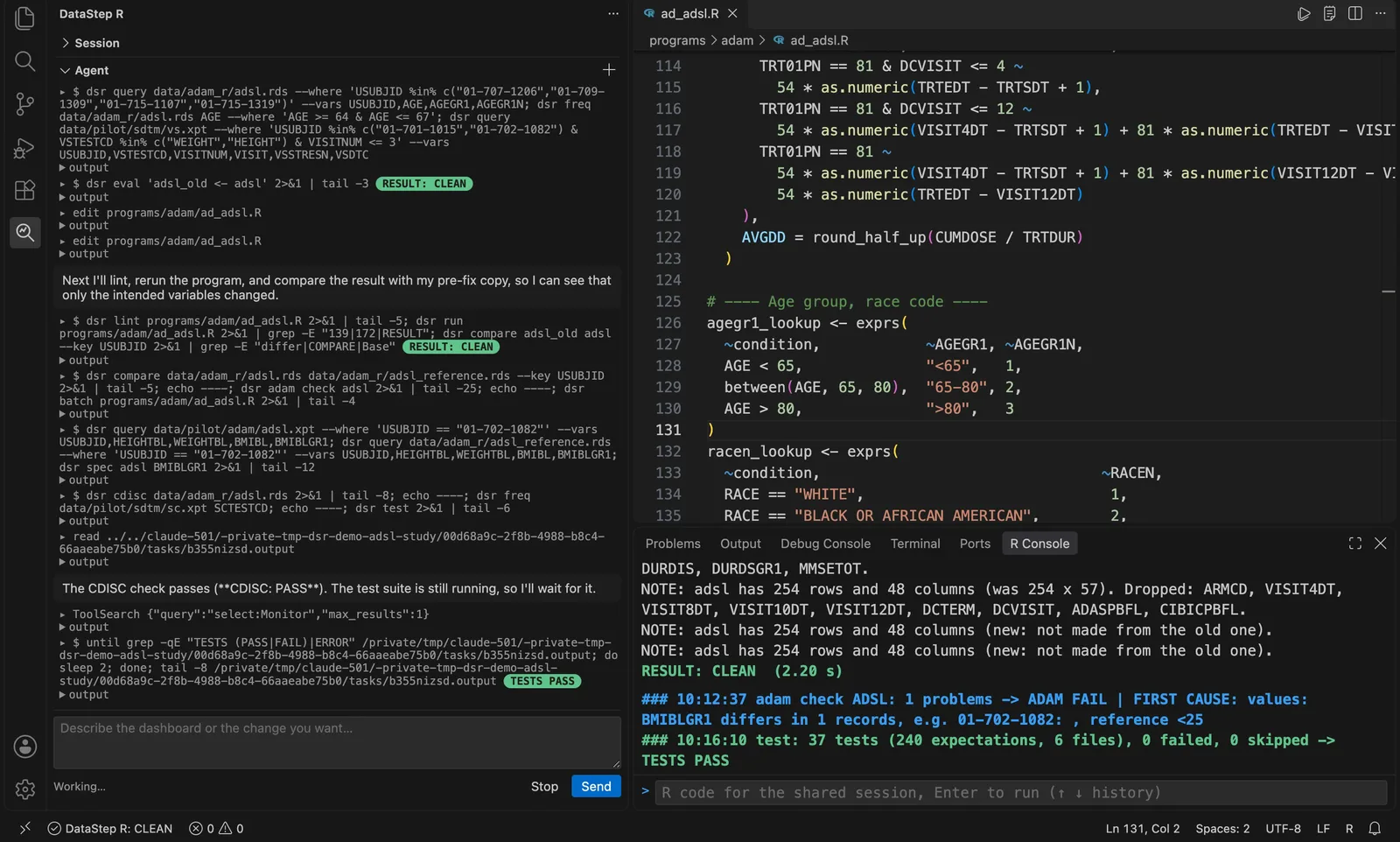
The Agent panel (Claude Code with the user's own login) programs ADSL of the CDISC pilot: lint, run, compare with its copy before the fix, dsr adam check, the tests. Recorded with the first build, 0.10.2.
dsr, or the Agent panel: Claude Code or a local model with Ollama.--json on every tool: the verdict, the line, the next step. Exit codes 0, 1, 2, 3. dsr guide teaches the way of working on one page.Run · Cmd/Ctrl+Shift+Enter
The program runs step by step in the session. The log shows each warning and error at its line, and each data frame a step makes: its rows and columns, the new columns, and how many values they miss.
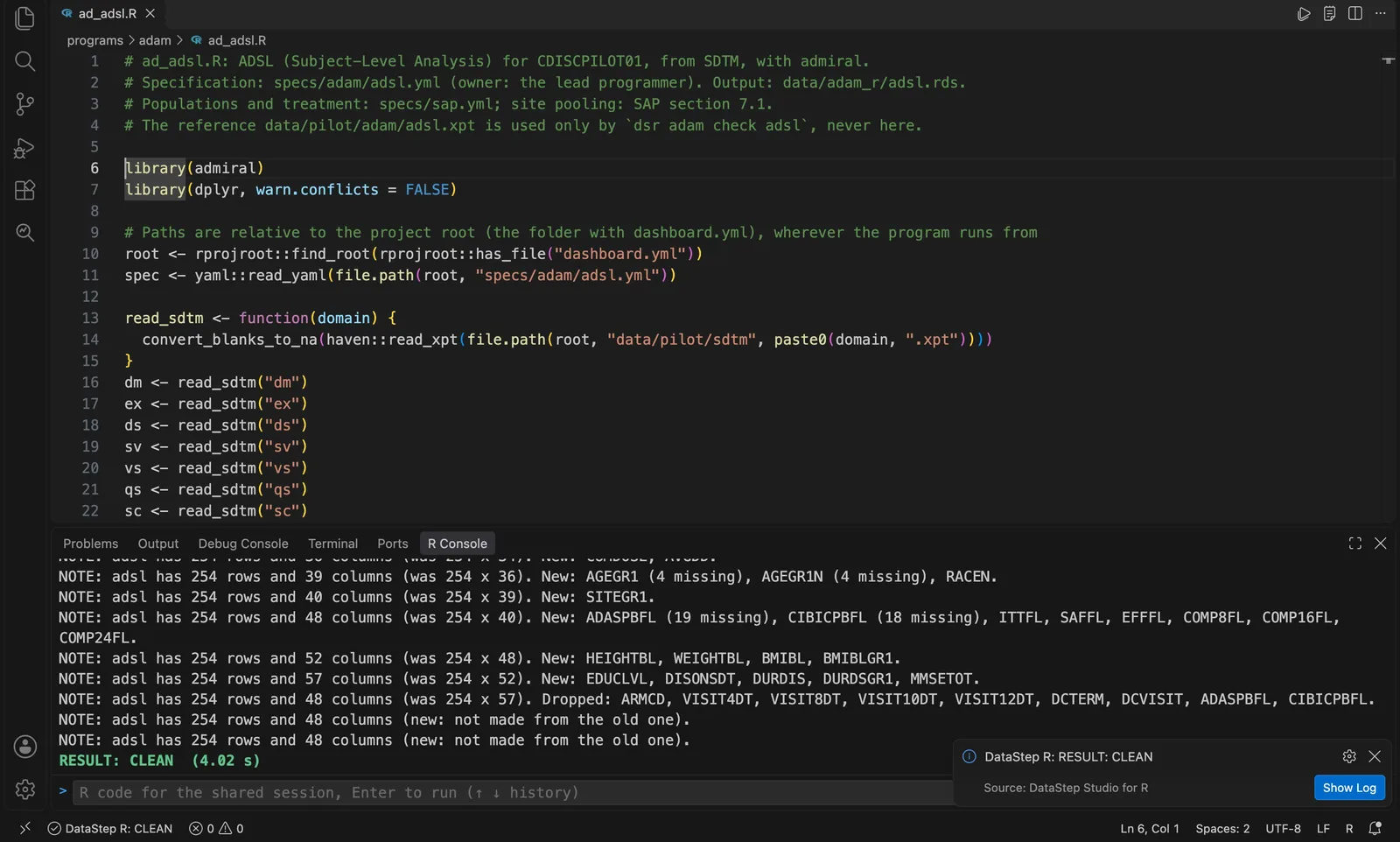
ADSL of the CDISC pilot study, programmed with admiral: a NOTE per step, then the verdict. Recorded with 0.10.2.
    3  NOTE: dm has 12 rows and 7 columns.
    4  NOTE: dm has 12 rows and 8 columns (was 12 x 7). New: BMI.
    5  NOTE: dm has 12 rows and 9 columns (was 12 x 8). New: BMIGRP (1 missing).
    6  NOTE: dm has 12 rows and 10 columns (was 12 x 9). New: AGEGRP.
    7  NOTE: n_subjects = 12
RESULT: CLEAN  (0.11 s)
No error, no warning, yet one subject got no BMI group. The NOTE says it on the line that made it. The verdict is CLEAN, CHECK or ERROR with its first cause.
Debug · F9 F5
A breakpoint in the margin, with a condition if you like. The run stops there, also inside a function, and waits: the call stack, the variables of each frame, the Debug Console in the frame. Then next, step in, step out, continue.
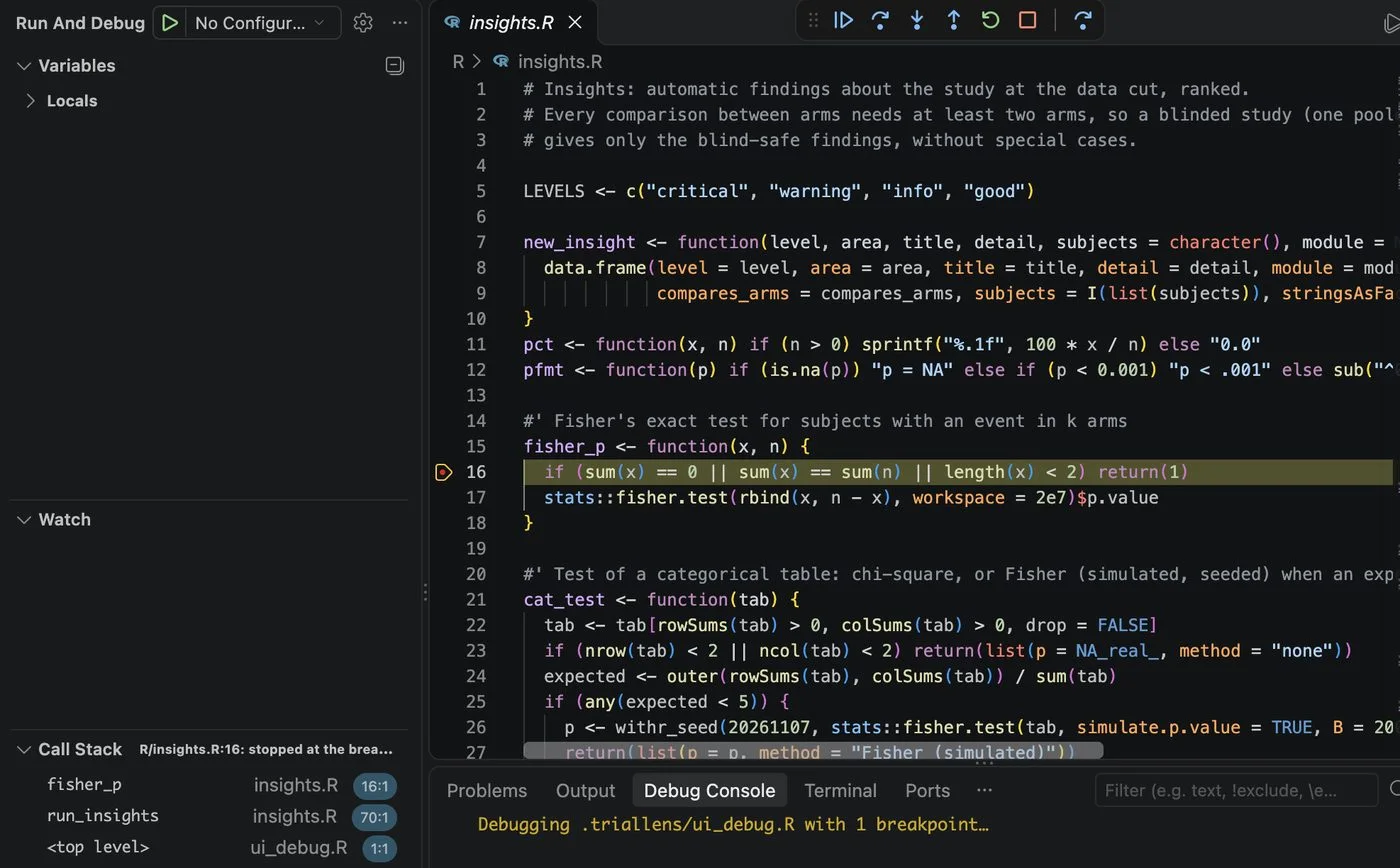
Stopped in fisher_p at a margin breakpoint. Taken by the extension's UI check, which drives VS Code like a user.
No need to run it again with a print: look at the objects of the frame where it failed, run R in it. Here one subject's weight is missing, so the BMI is NA. And pry() in your code stops a real run where you wrote it, also in a loop: pry(when = USUBJID == "S-110").
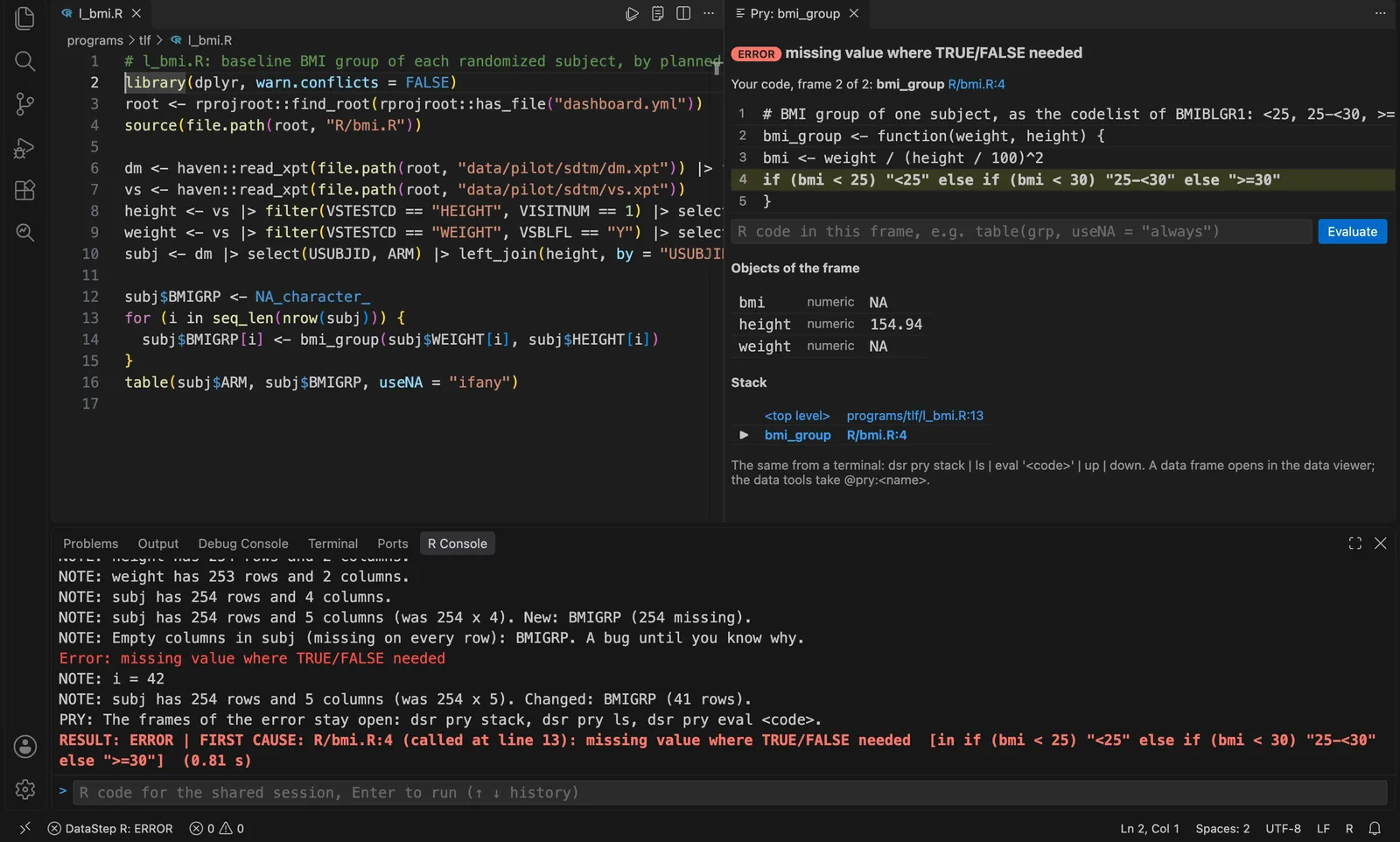
A listing program of the CDISC pilot fails in a helper; the Pry panel opens the helper's frame. Recorded with 0.10.2.
$ dsr run 04_debug.R --stop-at 'R/derive.R:11 if any(bmi == 30)'
=>   11    grp[bmi >= 25 & bmi < 30] <- "25-<30"
RESULT: PRY | AT: R/derive.R:11: stopped at the breakpoint
$ dsr pry next
RESULT: PRY | AT: R/derive.R:12: stopped (next)
$ dsr pry eval 'grp[bmi == 30]'
       [1] NA
An agent, or you, stops the run with --stop-at and goes on with dsr pry next. The editor's status bar shows the waiting stop, and the debugger can attach to it. Line 12 says > 30; the rule is >= 30.
Which tool when?
The debugger
Breakpoints in the margin, step by step, the variables of each frame.
F9, then F5
dsr run --stop-at
pry
A stop written in the code, also in a loop and for one subject.
pry(when = ...)
dsr pry next
Trace
Every line of one call, what it changed, each if with its values. No stop.
Trace Function Call
dsr trace --call
Pipe debugger
Each step of a pipeline with its rows before and after, and the records it dropped.
Debug the Pipeline
dsr pipe file:line
Trace · dsr trace --call
Trace runs one call and lists every line that ran, the variables each line changed, and each if with the values it compared. Start it from a form of the function's arguments.
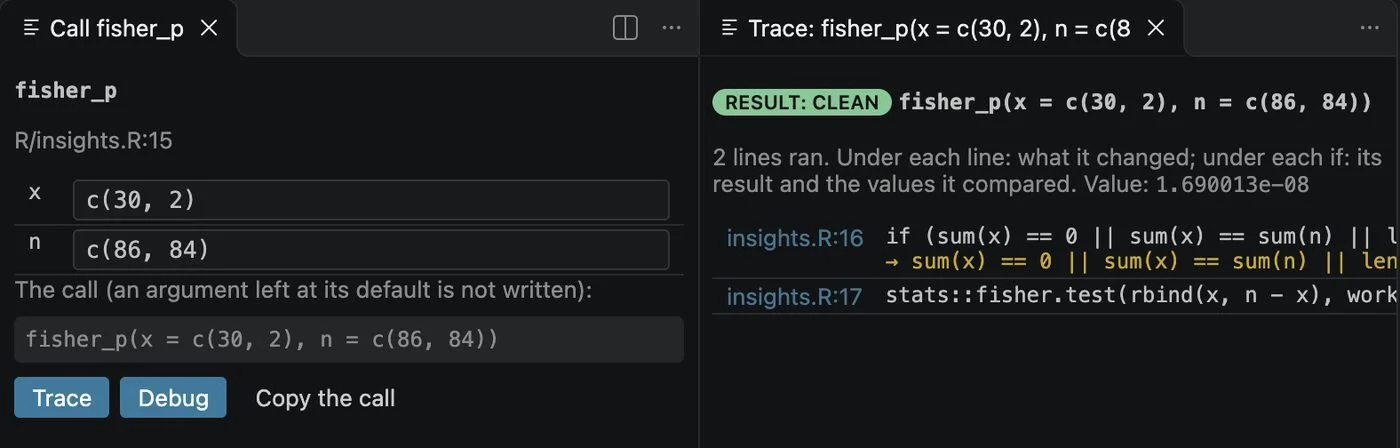
The call form and the trace it opened. Taken by the UI check.
$ dsr trace --call 'bmi_group(c(24.9, 30, 31))' R/derive.R
R/derive.R:9             grp <- rep(NA_character_, length(bmi))
                          grp = [3] "NA", "NA", "NA"
R/derive.R:10            grp[bmi < 25] <- "<25"
                          grp = [3] "<25", "NA", "NA"
R/derive.R:11            grp[bmi >= 25 & bmi < 30] <- "25-<30"
R/derive.R:12            grp[bmi > 30] <- ">=30"
                          grp = [3] "<25", "NA", ">=30"
Value: [3] "<25", "NA", ">=30"
RESULT: CLEAN  (0.05 s)
Pipe debugger · dsr pipe file.R:line
The pipeline at the cursor runs step by step. Each step shows its rows before and after, the columns it added or dropped, and the records it dropped, matched by USUBJID and the sequence number. One click shows them.
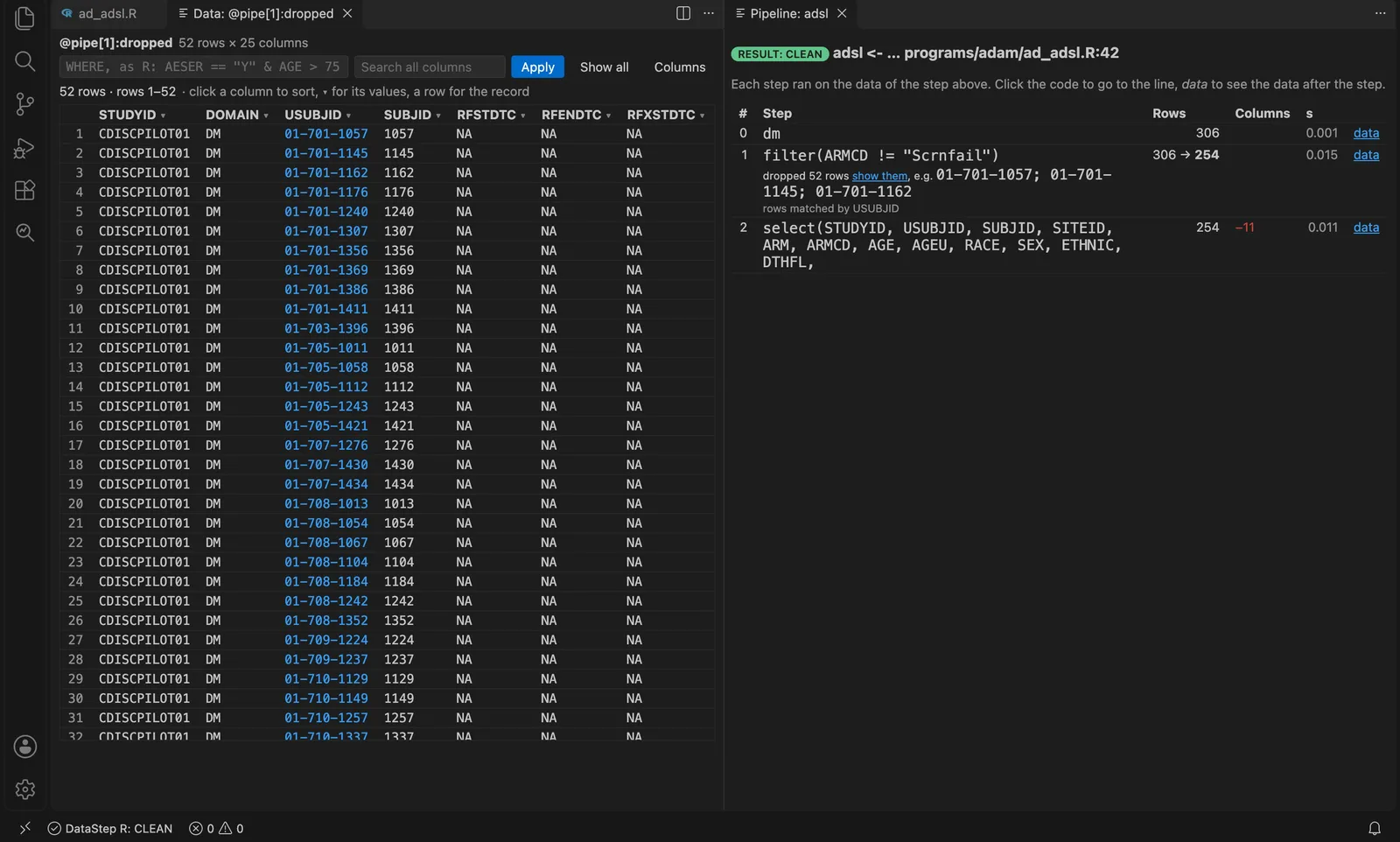
ADSL of the CDISC pilot: the screen failures the filter dropped, 52 subjects, in the data viewer. Recorded with 0.10.2.
$ dsr pipe 06_pipe.R:4
   0  ae                                                            17 rows
   1  merge(dm[c("USUBJID", "ARM", "TRTSDT")], by = "USUBJID")      17 -> 17     +ARM +TRTSDT
   2  transform(ASTDY = as.numeric(as.Date(AESTDTC) - as.Date(TRTS  17 -> 17     +ASTDY
   3  subset(ASTDY > 1)                                             17 -> 9
        dropped 8 rows, e.g. S-101 / 3; S-102 / 1
   4  subset(AESEV != "MILD")                                       9 -> 6
RESULT: CLEAN  (data after step k: @pipe[k]; rows step k dropped: @pipe[k]:dropped)
Data viewer · dsr describe | freq | means | dups | compare
Click a data frame: pages of rows straight from the session, so a large ADaM data set stays quick. Click a value to keep it, type >=75 under a column, press Enter on a cell. R code shows the view as dplyr and base R.
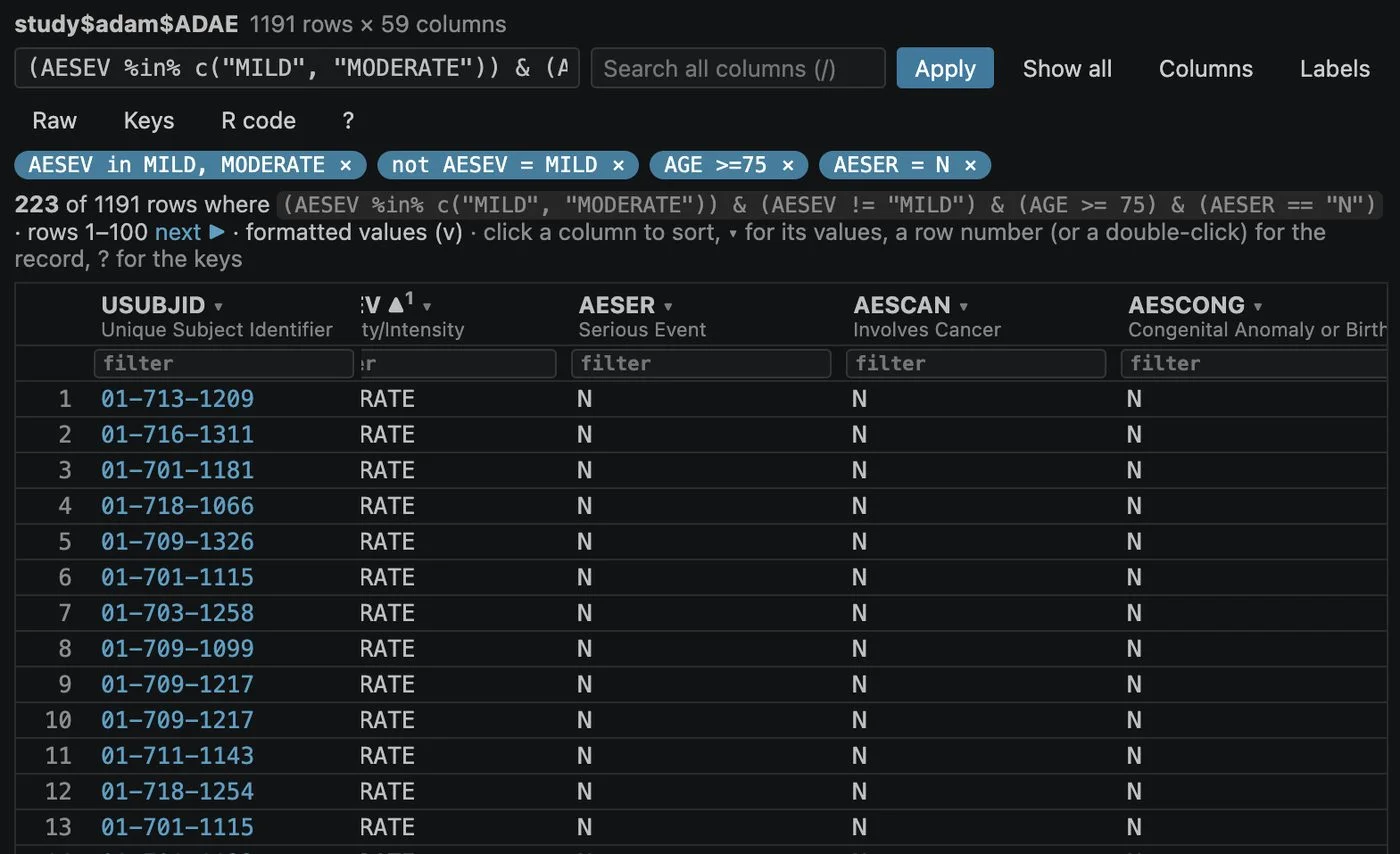
ADAE of the CDISC pilot: four filters as chips, 223 of 1191 rows. Taken by the UI check, which compares each count with R.
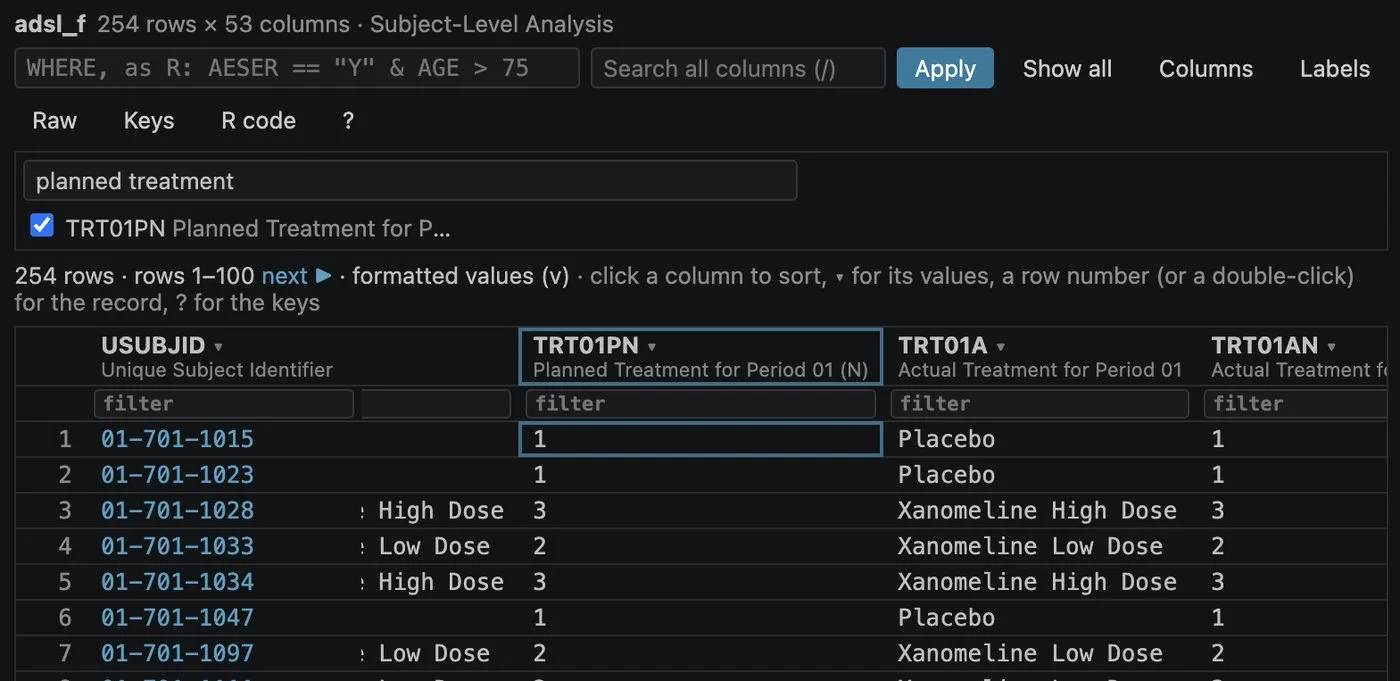
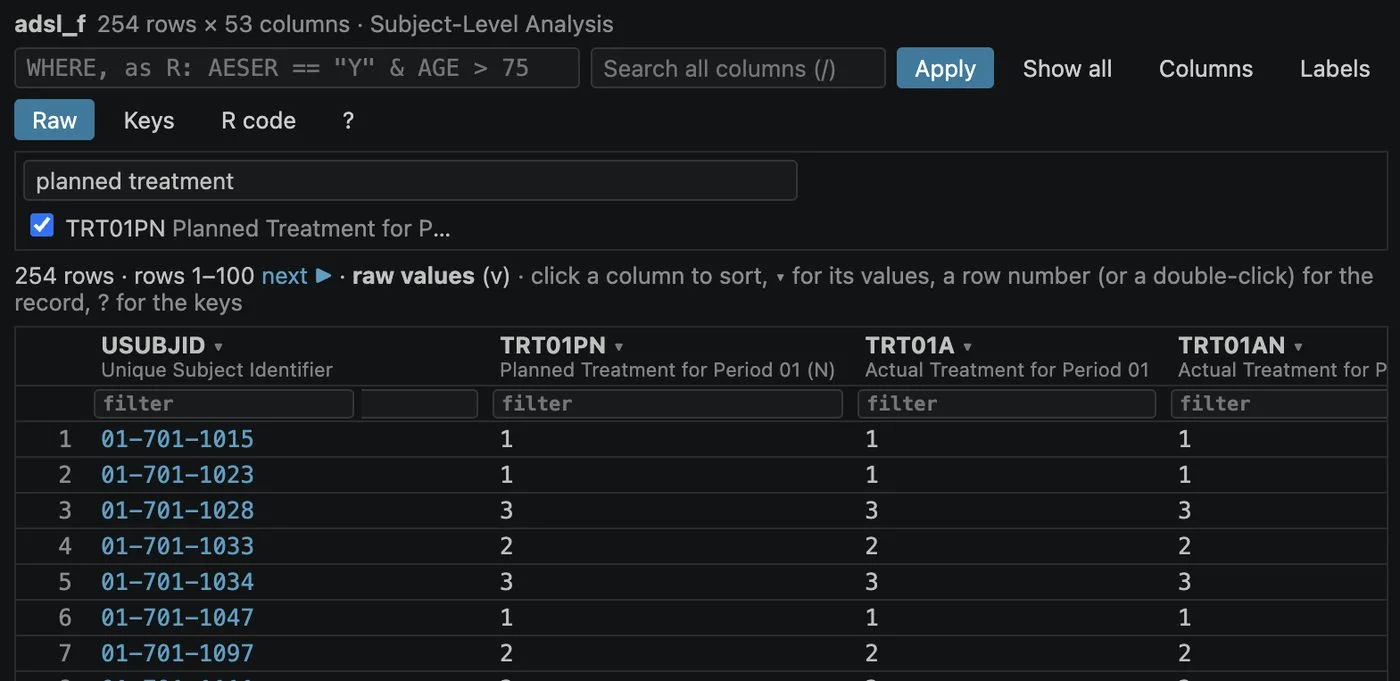
dsr describe, freq (also counting subjects), means, dups and compare, on a data frame or a file (.rds, .xpt, .sas7bdat, .csv).dsr subject 01-701-1015: the subject's records in each data set and the events in time order.@pry:adsl) and a pipeline step (@pipe[3]).Lint · autocomplete · format
On save, lint marks a function your installed package does not have, an argument name the function does not take, and a name with a typo, each with "did you mean".
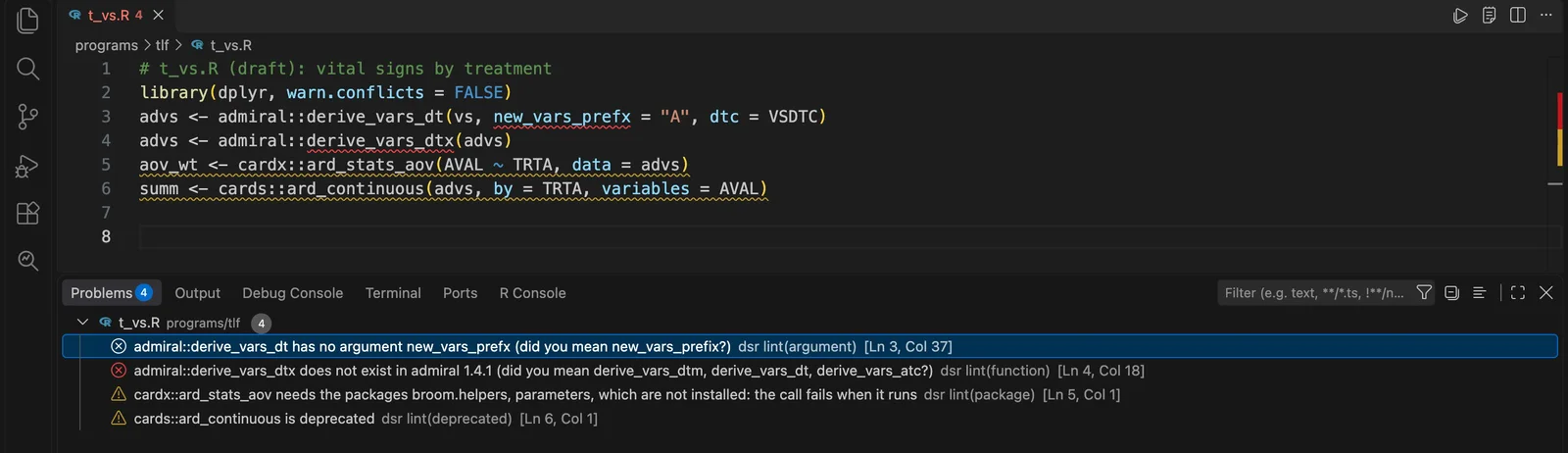
Four mistakes an agent made in a draft, found before the program ran: the editor and its Problems panel (the empty lines between them cut out). Recorded with 0.10.2.
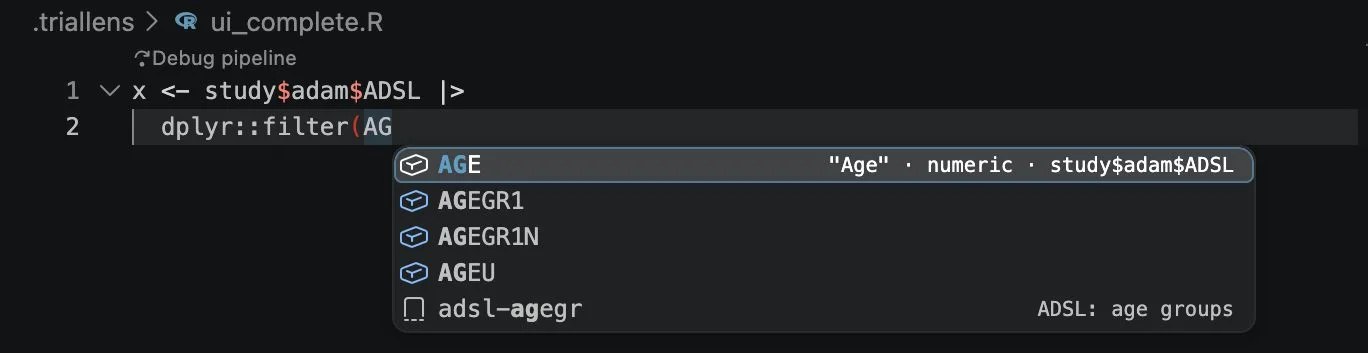
In a call or a pipe on a data frame, the suggestions are its columns with their labels, from the live session. Functions with their arguments, hover, signature help, go to definition, and clinical snippets.
before
summ<-function(x){
    n<-sum(!is.na(x)) # count
  c(n=n,mean=mean(x,na.rm=TRUE))}
after
summ <- function(x) {
  n <- sum(!is.na(x)) # count
  c(n = n, mean = mean(x, na.rm = TRUE))
}
proof: only the layout changed: the 35 tokens and 1 comments are the same
Format Document lays out R with styler in your project's style. It writes the file only when the tokens of the code and the comments are the same before and after.
Batch · tests · clinical checks
A program that ran in your session may still lean on it. A batch run proves it runs alone; the tests run in a clean R process; for clinical work the numbers are compared with their reference.
$ dsr batch 01_run.R 10_table.R
  CLEAN  01_run.R  log: 01_run.log  (0.3 s)
  CLEAN  10_table.R  log: 10_table.log  (0.3 s)
BATCH: CLEAN
$ dsr numbers output/t14_3_01.txt data/pilot/sources/csr.txt --table 14-3.01
output/t14_3_01.txt against data/pilot/sources/csr.txt (Table 14-3.01): 17 of 17 reference rows matched, 75 numbers compared
NUMBERS: MATCH
### 10:12:37 adam check ADSL: 1 problems -> ADAM FAIL | FIRST CAUSE: values:
BMIBLGR1 differs in 1 records, e.g. 01-702-1082: , reference <25
### 10:16:10 test: 37 tests (240 expectations, 6 files), 0 failed, 0 skipped ->
TESTS PASS
The batch run is from the manual's example study; the table check from the CDISC pilot study; the last two lines are the R Console's record of the agent's ADSL work shown above (the ADSL check found one record that differs from the double-programmed reference).
dsr numbersA table against a CSR page or a double-programmed table, row by row and number by number at the reference's decimals.dsr adam check, spec, cdiscAn ADaM data set against its specification and, cell by cell, its reference; conformance before a submission.dsr app check, gateA Shiny or teal dashboard opened headless, every page; each number of its contract from the data and on the screen.Three tasks in a study project with the pharmaverse data, each given to an agent with only the guide, and graded in a new R process. The trial of 2026-11-12:
| Task | Model | Grade | dsr calls |
|---|---|---|---|
| Find and fix a planted wrong derivation in ADAE | Haiku | PASS | 29 |
| A table program from its shell, its numbers proved against a CSR page | Sonnet | PASS | 30 |
| Refactor a function and prove nothing changed | Sonnet | PASS | 52, then 26 after the fixes the trial showed |
Install
In VS Code: Extensions, search DataStep Studio for R, Install. Or in a terminal:
code --install-extension datastep-labs.datastep-studio-rA folder with R code. The DataStep R icon appears in the activity bar, and the walkthrough Get started on the Welcome page.
The play button in the Session view. If R lacks a package, it says which and the command that installs it; dsr doctor in a terminal checks everything.
Open an R file and press Cmd/Ctrl+Shift+Enter. The R Console shows the log.
Needs VS Code 1.85 or later (or Positron), R 4.4 or later with Rscript on the PATH, Node.js 18 or later for the dsr command, and the R packages httpuv, later, promises, evaluate, jsonlite, testthat and callr (styler, lintr, yaml and haven add single tools). Positron, Cursor and VSCodium use another extension store: install the .vsix file there (Extensions: Install from VSIX). Step by step: Get started.
Preview 0.10.3
.Rproj file and the R extension for VS Code side by side: not tested.Something breaks or reads wrong? Please say so in the Q & A of the Marketplace page.
Privacy
The extension collects nothing: no telemetry, no usage data. The R session listens on 127.0.0.1 only, with a random token; the editor, dsr and the MCP server talk only to it.
Something leaves your computer only when you choose it: with the Agent panel and Claude Code, what the agent reads goes to Anthropic under your account (Ollama stays local); New Dashboard Project: Set up downloads R packages and the public CDISC pilot data. What talks to what, and how it was checked.
Questions
No. Every feature works without one and without an account. An agent uses the same tools.
Yes: the editor's checks (the session, the debugger with Run to Cursor, pry, format, autocomplete, lint, the data viewer) passed in Positron 2026.11. Positron's own R console runs next to it as a separate R.
Yes. The session starts in the project folder, so the project's .Rprofile and renv library are used.
Only when you ask: Format lays out the file you format, and only with its proof. Running and debugging do not change your files. The session keeps its own files in .triallens/ of the project.
No. The log, the debuggers, the data viewer, lint and format work on any R code. The clinical checks are there when you need them.
It is its R sibling: the same way of working (a log that points to the line, a data viewer, debuggers, pry), made for how R works. DataStep Studio for SAS.